This page summarises resources for Classic Bluetooth and Bluetooth Low Energy.
Overview
There is some confusion about the Bluetooth. Generally speaking, Bluetooth 1.0 - 3.0 includes classic Bluetooth. Bluetooth 4.0 starts to use Bluetooth Low Energy (BLE). A brief introduction about their difference can be found at link1, link2 and link3.
New features of Bluetooth 5 can be found External resource. The full and latest specification, v5.2 (released in 2019) can be downloaded External resource.
Unless otherwise highlighted, the following descriptions apply to BLE, which might not be correct for classic Bluetooth.
Tutorial
Network Architecture
- Point-to-Point and Point-to-Multipoint Connection Topology (Both Bluetooth classic and BLE)
- Broadcast Connection Topology (BLE only)
- Mesh Connection Topology (BLE only)
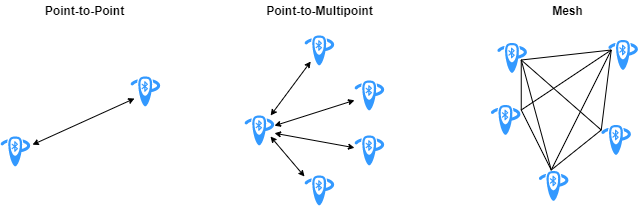
Figure from https://uk.mathworks.com/help/comm/ug/bluetooth-mesh-networking.html.
Protocol Overview
Visit MATLAB Bluetooth Protocol Stack for a detailed introduction about the Bluetooth and BLE protocol, and a mapping between them and the OSI model.
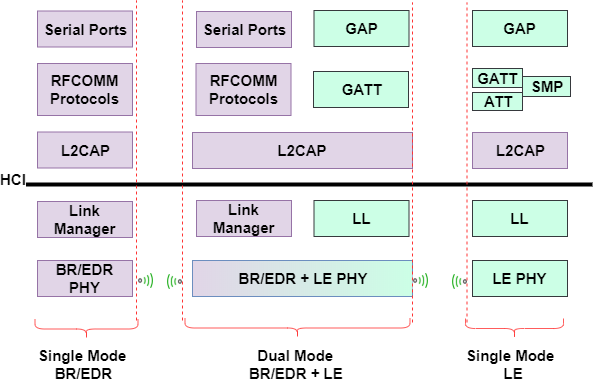
Figure from https://uk.mathworks.com/help/comm/ug/bluetooth-protocol-stack.html.
Some brief introduction of the protocol can be found at the Microchip Developer Center. The BLE protocol stack consists of
- Controller (Physical Layer and Link Layer)
- Host
- Application
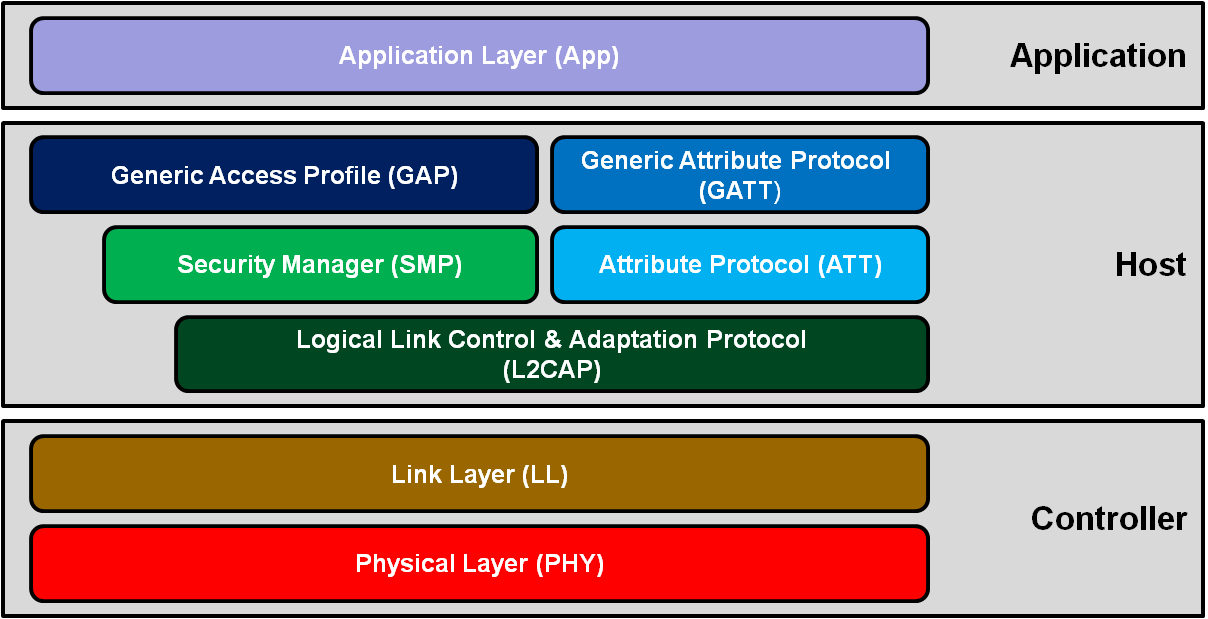
Figure from Microchip Develop Help - Bluetooth® Low Energy Link Layer.
Physical Layer
Some key features of the BLE physical layer
- 2.4GHz ISM band. The band between 2.402 GHz to 2.4835 GHz is divided into 40 channels with 2 MHz channel spacing, $f_k = 2402 + k*2 MHz, k = 0, 1, …, 39$
- The 40 channels are divided into advertising channels (Ch. 37, 38, and 39) and 37 data channels (Ch. 0-36).
- Gaussian Frequency-Shift Keying (GFSK).
- Adaptive Frequency Hopping for data channels. The channel selection algorithms can be found in Section 4.5.8 of Part B vol. 6. There are two algorithms defined and the algorithm#1 selects the channel as $f_{n+1} = (f_n + hop)$ mod 37, where hop ranges from 5-16.
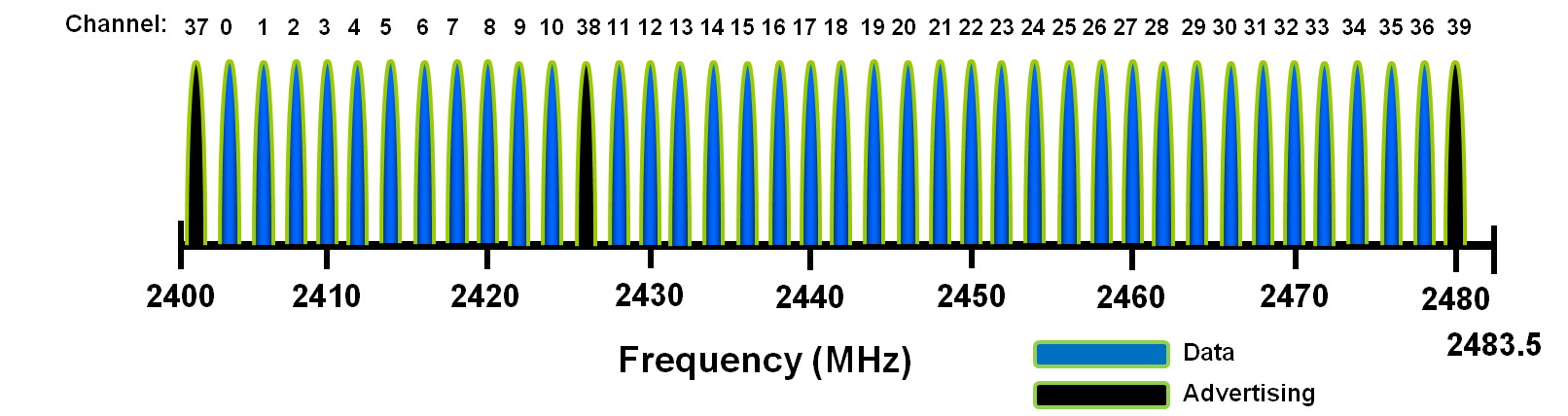
Figure from Microchip Develop Help - Bluetooth® Low Energy Channels.
Preamble
The preamble defined in BLE v5.2:
- LE IM packets (8 bits): 10101101, or 01010101
- LE 2M packets (16 bits): 1010110110101101, or 0101010101010101 Preamble is used for frequency synchronization, symbol timing and automatic gain control. Visit Page 2865 Section 2.1.1 Vol 6, Part B of the Bluetooth Core Specification v5.2.
Link Layer
- Advertising and Scanning
- Connection
- Network Topology - Piconet
- Security - AES - CCM
Advertising Channel
Channel 37, 38 and 39
- Device Discovery
- Connection Establishment
- Broadcast Transmissions
Data Channel
Channel 0-36
- Data transmissions
- Frequency hopping is used to select different channels.
Packet Type
The same packet format for both
- Advertising channel packets
- Data channel packets
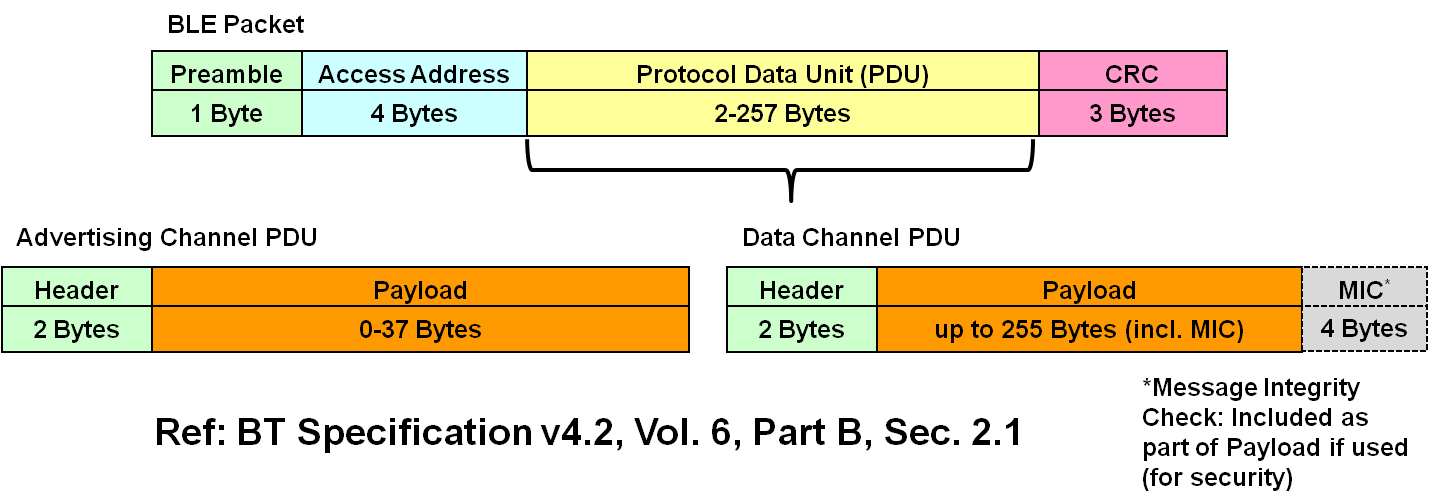
Figure from Microchip Develop Help - Bluetooth® Low Energy (BLE) Link Layer Packet Types.
Discovery Process
- Advertising interval: 20 ms
- Scan interval: 50 ms
- Scan window: 25 ms
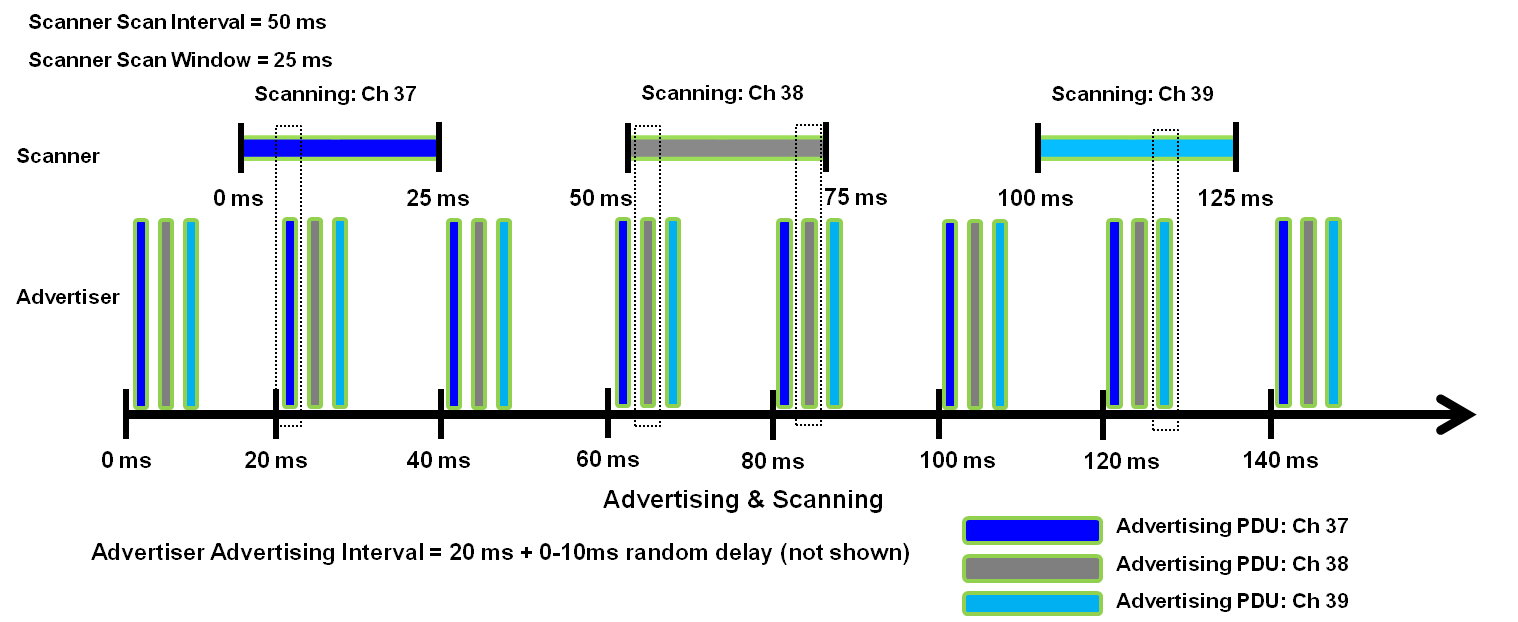
Figure from Microchip Develop Help - Bluetooth® Low Energy Discovery Process.
Connection Process
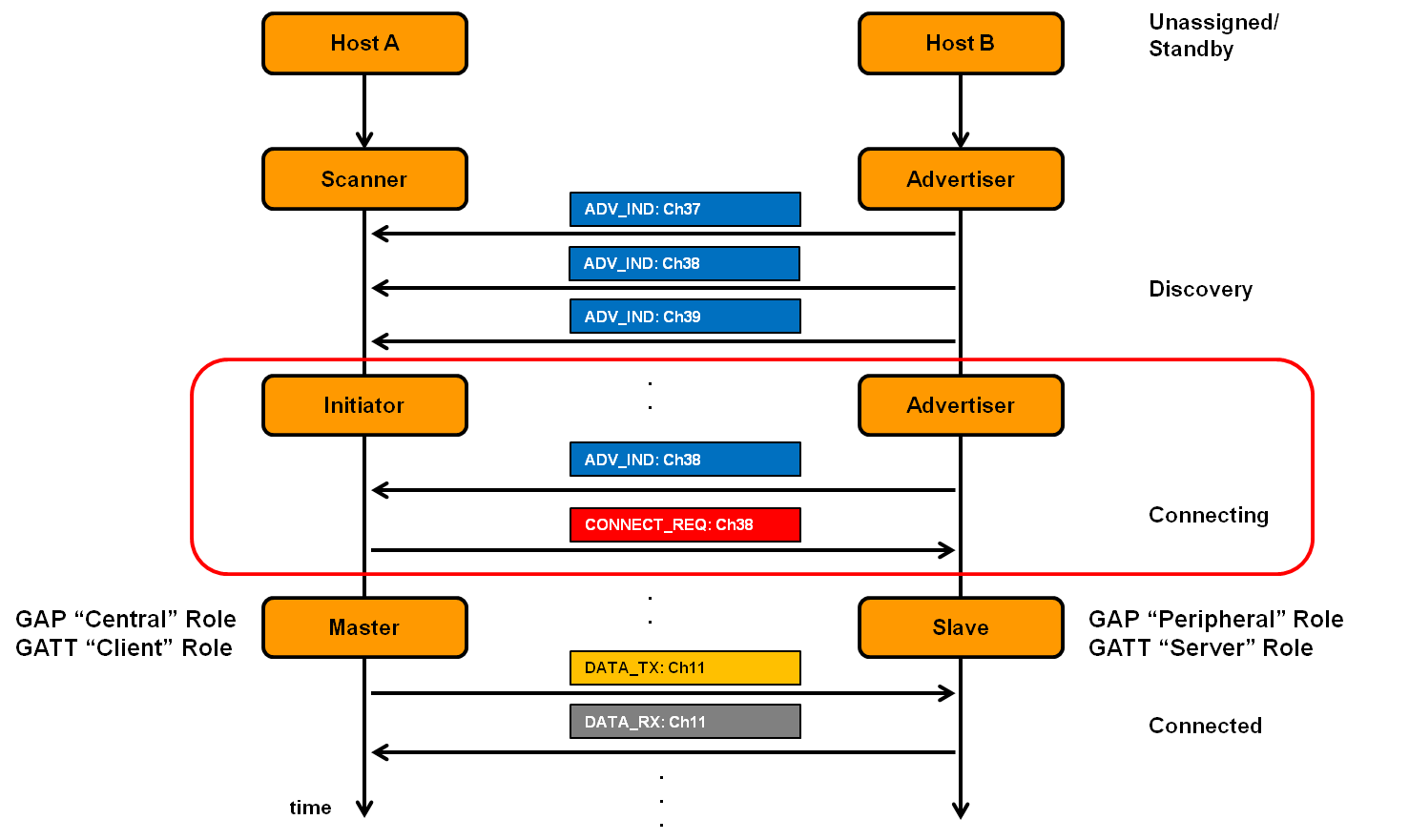
Connection establishment. Figure from Microchip Develop Help - Bluetooth® Low Energy Connections.
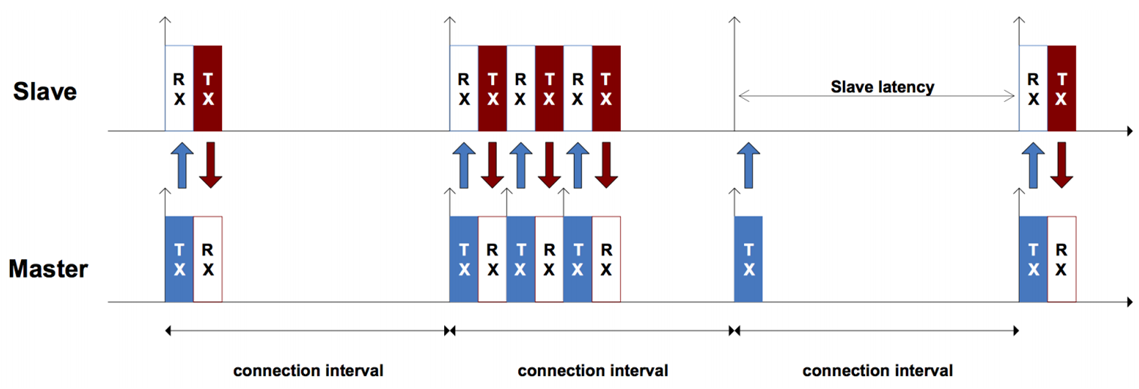
Connected phase. Figure from Microchip Develop Help - Bluetooth® Low Energy Connections.
Development Kit
Texas Instruments
- TI BLE SDK support Bluetooth 4.2 and Bluetooth 5.
- TI BLE-Stack for Bluetooth 4.2 API Documentation 3.01.00.07
- SimpleLink™ CC26x2 SDK BLE5-Stack User’s Guide.
- SimpleLink™ CC13x2 / CC26x2 SDK BLE5-Stack User’s Guide.
- Supported TI devices can be found External resource.
Nordic Dongles
https://www.nordicsemi.com/Products/Wireless/Bluetooth-Low-Energy
ESP32
https://www.espressif.com/en/products/socs/esp32
MATLAB Bluetooth Support
MATLAB’s Bluetooth Toolbox provides tools for modelling, simulating, and testing Bluetooth Classic (BR/EDR) and Bluetooth Low Energy (BLE) systems. It supports physical-layer (PHY) studies, communication-link analysis, and software-defined radio (SDR) experiments.
Simulation and analysis resources:
- PHY modelling: explore waveform generation and transmitter/receiver processing for Bluetooth BR/EDR and LE.
- Link-level simulation: investigate bit error rate (BER) and packet error rate (PER), and assess the effects of noise, fading, RF impairments, and interference.
- Getting started with Bluetooth Toolbox: find tutorials on waveform visualisation, direction finding, and network simulation, including mesh and LE Audio scenarios.
SDR experiments: The Bluetooth BR/EDR waveform generation and transmission using SDR example demonstrates baseband waveform generation, spectrum visualisation, and transmission using an ADALM-PLUTO radio. It also supports saving waveforms to a baseband file and links to a companion SDR reception example for capture and decoding.
Suggested starting exercise: Begin with waveform generation and visualisation, then work through a BLE link-level simulation. Compare BER or PER across signal-to-noise ratios, and investigate how frequency offset or fading changes the results. Move to SDR experiments after understanding the simulated transmitter and receiver.
Requirements: Simulation does not require radio hardware. Check each example’s required products against your installed MATLAB release; SDR experiments also require the specified radio and its support package.
Connecting to BLE peripherals: MATLAB provides a separate Bluetooth Low Energy communication interface. Use blelist to discover advertising peripherals, ble to connect, and characteristic objects to read or write device data. This interface uses the computer’s Bluetooth adapter for device communication; Bluetooth Toolbox and SDR examples support waveform and system-level experiments. Check the interface documentation for supported operating systems and adapter requirements.
Bluetooth Stack
Linux
- C language: BlueZ. Check An Introduction to Bluetooth Programming about its usage.
- Python: bluepy.
Micropython
Note: The module is still under development and its classes, functions, methods and constants are subject to change. It only supports the basic BLE functions.
Scapy for Bluetooth
Return to the Main Page of Wireless Communication Technologies.