Wi-Fi devices can operate in several different modes depending on their role in a wireless network. Among these, the most commonly used modes are Station (STA), Access Point (AP), and Monitor Mode. These modes are primarily associated with the IEEE 802.11 MAC layer, as they define how a device interacts with other Wi-Fi devices and processes wireless frames.
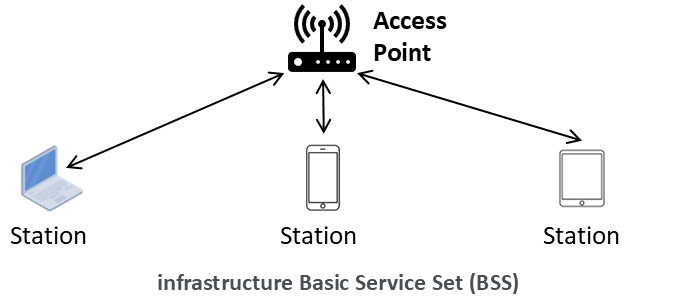
A Wi-Fi network typically operates in an infrastructure Basic Service Set (BSS), which consists of an Access Point (AP) and one or more Stations (STAs), as shown in the figure below.
- Access Point mode allows a Wi-Fi device to create and manage a Wi-Fi network. Wireless routers and enterprise access points typically operate in this mode.
- Station mode is the default operating mode for most Wi-Fi clients such as laptops, smartphones, tablets, and IoT devices. In this mode, a device connects to an existing Wi-Fi network by associating with an Access Point.
Many modern Wi-Fi chipsets can operate as both STA and AP simultaneously, enabling features such as Wi-Fi hotspots and tethering.
Station (STA) Mode
A station performs several MAC-layer functions, including:
- Scanning for available networks
- Authenticating with an Access Point
- Associating with an Access Point
- Exchanging management, control, and data frames
- Following the medium access rules defined by IEEE 802.11
Once associated, the station can transmit and receive data through the Access Point. In a typical home or enterprise Wi-Fi network, most devices operate in STA mode.
Access Point (AP) Mode
An Access Point is responsible for:
- Broadcasting beacon frames
- Advertising network capabilities and security settings
- Handling authentication and association requests
- Managing connected stations
- Forwarding traffic between wireless clients and the wired network
From a MAC-layer perspective, the AP serves as the coordinator of an infrastructure Basic Service Set (BSS). It provides the network that stations join and acts as the central communication point for associated clients.
Monitor Mode
Monitor mode differs significantly from STA and AP modes. Instead of participating in a wireless network, a device operating in monitor mode passively listens to all wireless traffic on a selected channel.
In monitor mode, the device:
- Does not associate with an Access Point
- Does not authenticate with any network
- Captures management, control, and data frames from nearby devices
- Observes wireless activity without actively participating
Monitor mode is widely used for:
- Network troubleshooting
- Wireless protocol analysis
- Security research
- Spectrum monitoring
Because the device does not join the network, it can often observe traffic from multiple devices simultaneously, making monitor mode a valuable tool for wireless researchers.
Comparing the Three Modes
| Feature | Station (STA) | Access Point (AP) | Monitor Mode |
|---|---|---|---|
| Joins a Wi-Fi network | Yes | No (creates network) | No |
| Creates a Wi-Fi network | No | Yes | No |
| Exchanges user data | Yes | Yes | Typically No |
| Sends beacon frames | No | Yes | No |
| Associates with AP | Yes | N/A | No |
| Captures all nearby frames | No | Limited | Yes |
| Typical usage | Client devices | Routers and hotspots | Analysis and research |
Why These Modes Matter for Wi-Fi Research
For wireless networking research, understanding these operating modes is essential. STA and AP modes represent normal network operation and are commonly used when evaluating protocol performance, throughput, latency, and reliability.
Monitor mode, however, provides visibility into the wireless medium itself. It enables researchers to capture raw IEEE 802.11 frames and, on some chipsets, obtain physical-layer information such as Channel State Information (CSI). As a result, monitor mode has become a fundamental tool for Wi-Fi sensing, localization, device identification, and RF fingerprinting research.
Although all three modes use the same underlying physical layer, they differ substantially in their MAC-layer behavior and intended purpose. Together, they form the foundation of how Wi-Fi devices communicate, manage networks, and observe wireless activity.
Other Wi-Fi Operating Modes
In addition to Station (STA), Access Point (AP), and Monitor Mode, the IEEE 802.11 standard and modern Wi-Fi implementations support several other operating modes for specialized networking scenarios.
Some notable examples include:
- Ad Hoc (IBSS) Mode – Allows devices to communicate directly with one another without requiring an Access Point. Each device acts as a peer within the network.
- Mesh Mode (802.11s) – Enables multiple wireless nodes to form a self-organizing and self-healing mesh network, where devices can forward traffic on behalf of other nodes.
- Wi-Fi Direct (P2P) Mode – Facilitates direct communication between devices without the need for a traditional wireless router or Access Point.
- Wireless Distribution System (WDS) – Allows Access Points to connect wirelessly to one another, extending network coverage and enabling wireless bridging.
- Repeater or Extender Mode – Expands the coverage area of an existing Wi-Fi network by receiving and retransmitting wireless traffic.
Many of these modes are implemented using combinations or extensions of the fundamental STA and AP functionalities. For example, a wireless repeater often operates simultaneously as a station connected to an upstream Access Point and as an Access Point serving downstream clients.
While these specialized modes are important for particular deployment scenarios, STA, AP, and Monitor Mode remain the most widely used modes in commercial Wi-Fi devices and wireless networking research.
Linux iwconfig
Set the operating mode of the device, which depends on the network topology. The mode can be Ad-Hoc (network composed of only one cell and without Access Point), Managed (node connects to a network composed of many Access Points, with roaming), Master (the node is the synchronisation master or acts as an Access Point), Repeater (the node forwards packets between other wireless nodes), Secondary (the node acts as a backup master/repeater), Monitor (the node is not associated with any cell and passively monitor all packets on the frequency) or Auto.
Return to the Main Page of Wireless Communication Technologies.